Thursday, March 19, 2009

The slowest fast train in the world -Glacier Express

Travelling on the famous Swiss mountain railways - Glacier Express will be too amazing. which has been operating since 1930 and averages 36 km/h (22 mph) during the approximately 7½-hour trip journey on its most popular route, Zermatt to St. Moritz or vice versa..


Next generation geeks


Picture Puzzles Quiz


Google Voice, the New Version of GrandCentral


Nearly two years after acquiring “one telephone for life” service GrandCentral, Google is finally preparing to relaunch the service with new features. GrandCentral has been in private beta for the last two years. Over the next few days Google will be prompting existing beta users to upgrade to Google Voice before rolling out the service to new users in a few weeks.


GrandCentral lets you set up a sngle phone number that you can give out to anyone. When they call that number, it will ring any phone number you’ve linked to the account. So you can print a single number on your business card, and people will be able to reach you on your home, work, and cellphones. The service also lets you record phone calls, screen calls, create rules for calls coming from specific numbers, and receive email notifications of voicemail messages.

Google Voice has all those features, plus a few new ones, like the ability to make free calls to US numbers and cheap calls to other numbers, make conference calls, and send, receive, store, and search SMS messages.

You’ll also get transcripts of all your voicemail messages.

Google will use an automated method to convert speech to text which will help them to decide relevant ads that will show up in your sidebar. And in order to determine what ads are relevant, Google needs to translate speech to text.

The company admits that the automated transcripts won’t be perfect. But the company has been fine tuning its speech recognition software for the last year or two with the Goog-411 service.

You can find a more complete list of Google Voice features at the Google Voice homepage.

Friday, March 13, 2009

Find the man in the beans


THE TRICK IS TO FIND THE MAN IN THE COFFEE BEANS:


This is bizarre - after you find the guy - it's so obvious.  Once you find him - it's embarrassing, and you think, Why didn't I se e him immediately?


Doctors have concluded that if you find the man in the coffee beans in 3 seconds, the right half of your brain is better developed than most people. If you find the man between 3 seconds and 1 minute, the right half of the brain is developed normally. If you find the man between 1 minute and 3 minutes, then the right half of your brain is functioning slowly and you need to eat more protein. If you have not found the man after 3 minutes, the advice is to look for more of this type of exercise to make that part of the brain stronger!!!

And, yes, the man is really there!!!

How to encrypt, password protect and lock files in Excel 2007?

Excel 2007 offers better file protection options. You can easily encrypt, password protect files and thereby lock files created using Microsoft office Excel 2007. 


How to password protect files in Excel 2007?

  • Open the excel 2007 file that you intend to encrypt, password protect and lock
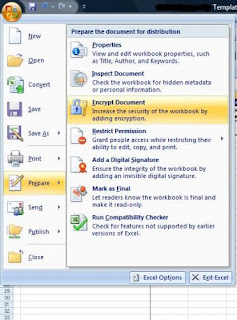
  • Click on the office Orb on the top left
  • Select Prepare >> Encrypt document 

  • An Encrypt document dialog box pops up with an option for you to set password
  • Enter a strong password and click Ok
  • A confirm password dialog box pops up with an option for you to re-enter password and confirm it
  • If you are done with your work on the excel 2007 file, save your excel file
  • Another microsoft excel dialog box pops up with the message “This document is both encrypted and password protected. The office Open XML Formats available in the 2007 release provide stronger encryption.Do you want to increase the security of this document by converting to an Office open XML format ?”
  • If you want more stronger security, click Yes else click No in the above dialog box
  • close the excel 2007 file
That is all!!! When you try opening the encrypted and password protected excel 2007 document, you will be asked to enter the password. However,if your forget or loose password it cannot be recovered in a straight forward manner.Special softwares may be required to recover the password.Hence it is advisable to keep a list of passwords and their corresponding document names in a safe place. 

Did U Know????