
Showing posts with label google. Show all posts

Saturday, March 21, 2009

How to add blogger sitemap to google webmaster tool


Submitting the Sitemaps of your blog to Google Webmaster helps the search engine(Google) to crawl your webpages easily and more quickly! This post explains the procedure to add your blogger blog's sitemap to the Google Webmaster Tools.

1. Sign-in to Googl
e Webmaster Dashboard using your Google Account.

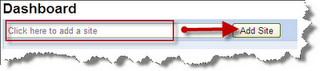
2. Type your blog URL and click Add Site:


3.Once your site is added to Google Webmaster, you need to verify the site by adding Meta Tag to your blog:


4.Copy the Meta Tag code given by Google Webmaster as shown in the screenshot below:


5. Now go to Blogger Dashboard - Layout - Edit HTML - then search(Ctrl+F) for the code given below in the header section:

6.Then Paste the Meta Tag just after the above code and Save the Template.

7. Now click Verify in the Google Webmaster Tools. Your site will be verified if you followed the above steps clearly:


8.Next step is to add sitemaps of your blog. Select Sitemap from the left sidebar:


9.You can add the following sitemaps of your blogger blog to the Google Webmaster:
http://www.YourBlog.com/atom.xml?redirect=false

http://www.YourBlog.com/feeds/posts/default?=rss


10. Finished! Your Blog's sitemap will be added to Google now!

Drop Comments below if you liked this post! Happy Blogging!

Thursday, March 19, 2009

Google Voice, the New Version of GrandCentral


Nearly two years after acquiring “one telephone for life” service GrandCentral, Google is finally preparing to relaunch the service with new features. GrandCentral has been in private beta for the last two years. Over the next few days Google will be prompting existing beta users to upgrade to Google Voice before rolling out the service to new users in a few weeks.


GrandCentral lets you set up a sngle phone number that you can give out to anyone. When they call that number, it will ring any phone number you’ve linked to the account. So you can print a single number on your business card, and people will be able to reach you on your home, work, and cellphones. The service also lets you record phone calls, screen calls, create rules for calls coming from specific numbers, and receive email notifications of voicemail messages.

Google Voice has all those features, plus a few new ones, like the ability to make free calls to US numbers and cheap calls to other numbers, make conference calls, and send, receive, store, and search SMS messages.

You’ll also get transcripts of all your voicemail messages.

Google will use an automated method to convert speech to text which will help them to decide relevant ads that will show up in your sidebar. And in order to determine what ads are relevant, Google needs to translate speech to text.

The company admits that the automated transcripts won’t be perfect. But the company has been fine tuning its speech recognition software for the last year or two with the Goog-411 service.

You can find a more complete list of Google Voice features at the Google Voice homepage.